DRAFT landing content. Not live.
See your R&D credit picture before you call your CPA.
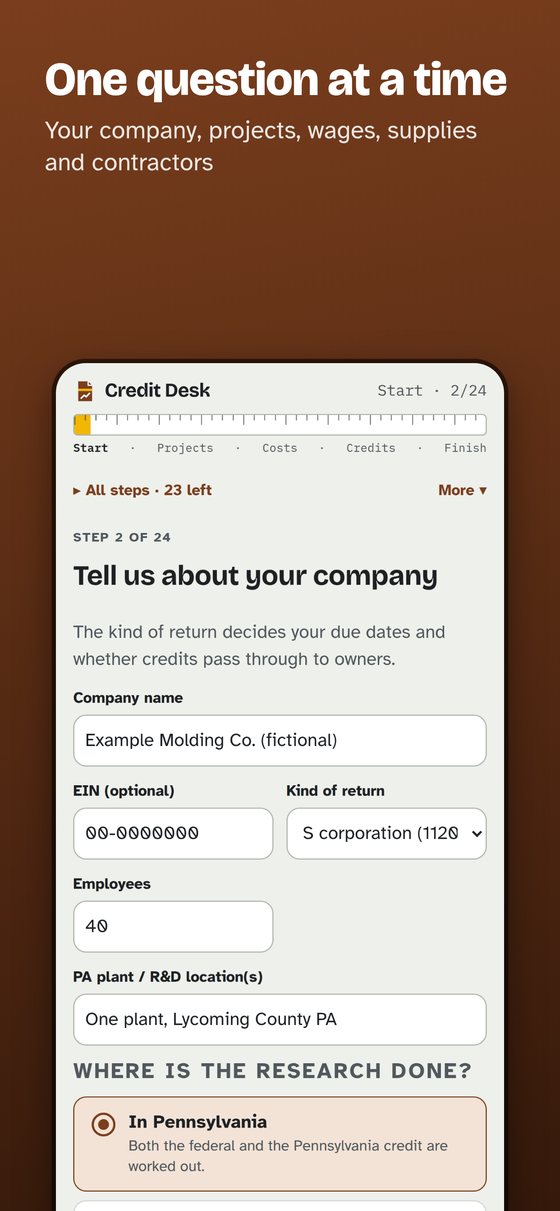
Credit Desk is a worksheet that interviews you about your projects, wages, supplies and contractors, then shows an estimate of the federal research credit and the Pennsylvania R&D credit, with the arithmetic on the page and a way to trace every figure back to what you typed.
iPhone, iPad and Mac apps are coming to the App Store.
Who it is for
Owners of small manufacturers, machine shops and engineering firms that design, test and improve products or processes, and the CPAs who prepare their returns. Pennsylvania's small-business set-aside left money unused in recent cycles, and few Lycoming County firms appear among the awardees.
How it works
Your company, your projects, your people and your costs. Samples are built in so you can try it with fictional data. Money boxes take it the way you write it: commas, cents, a dollar sign.
The four-part test, one project at a time, with the description boxes the Pennsylvania application asks for.
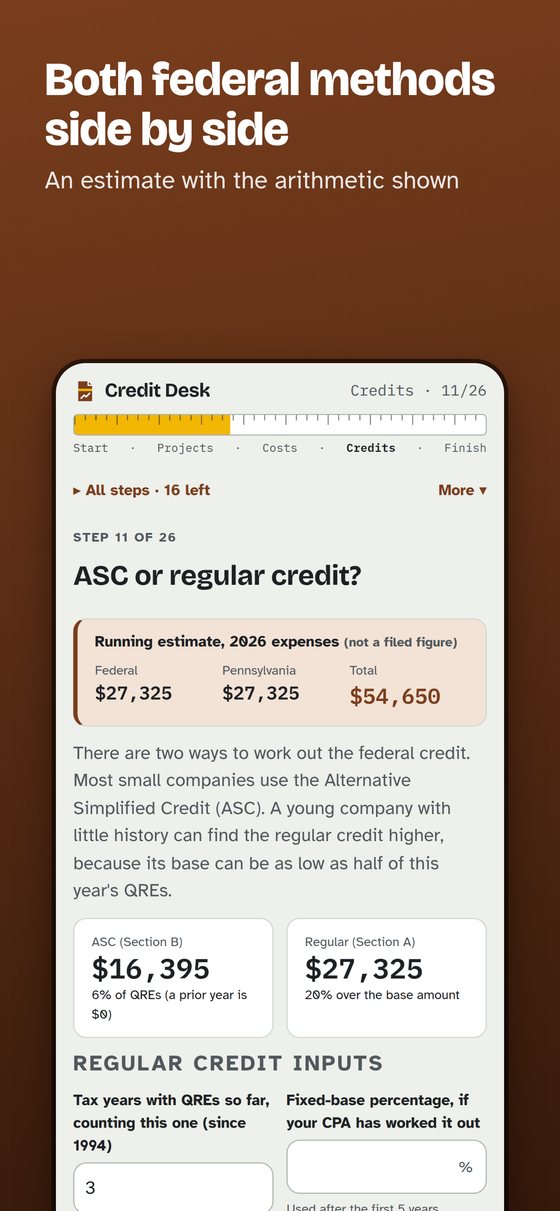
The Alternative Simplified Credit and the regular credit side by side, including the start-up rate, plus the payroll-tax election for young companies. A first-year path explains what to do with no earlier research costs.
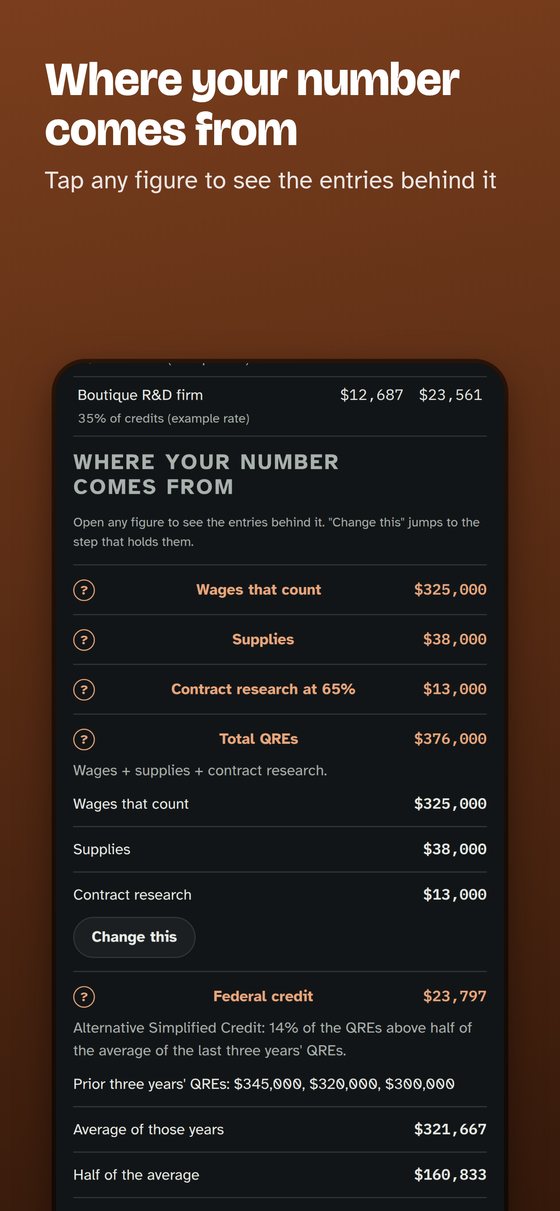
Tap any figure (wages, supplies, contract research at 65 percent, the federal credit, the Pennsylvania credit) to see the entries and the arithmetic behind it.
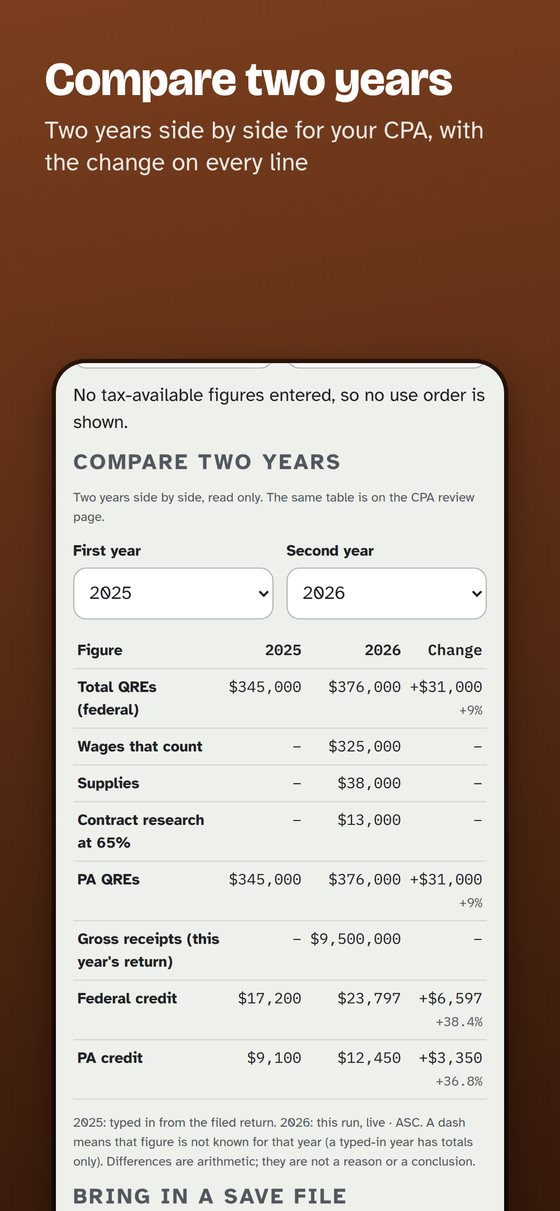
Two saved years side by side with the change on every line. It is arithmetic, not a conclusion.
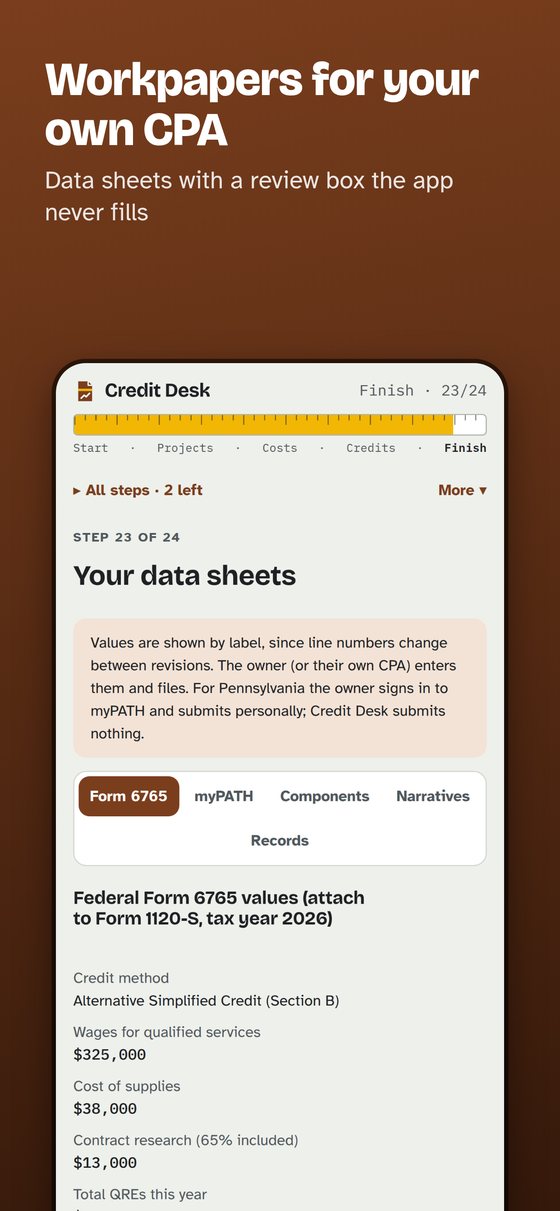
One read-only CPA review page, data sheets with a review box the app never fills in, and a one-page summary for the owner.
What is in it
- Federal and Pennsylvania estimates, with the arithmetic shown
- Where your number comes from: every figure opens to its inputs
- Compare two years, and bring in a save file from another year without replacing what you have
- Several companies on one device
- Form 6765 Section D, E and G detail
- Pennsylvania application window (opens Aug 1, closes Dec 1) and your return dates in your calendar, each with its source; the award-notice date is a statutory deadline (72 P.S. 8703-B(c))
- An "If the IRS asks" checklist with sources
- A what-if wages slider on the Worth-it step, labelled as an estimate and usable with VoiceOver
- A Pennsylvania small-business explainer using the state's own 2026 numbers: 193 of 665 applicants were small and paid 100 percent, and the larger group was prorated to 32.8 percent
- A "for your CPA" card that sets section 174A and the section 280C(c) choices side by side as arithmetic, with the figures you type; no recommendation, your CPA decides
- Your first 15 minutes: a seven-stop tour of a made-up company, with the example data labelled, so you can look around before you type anything real
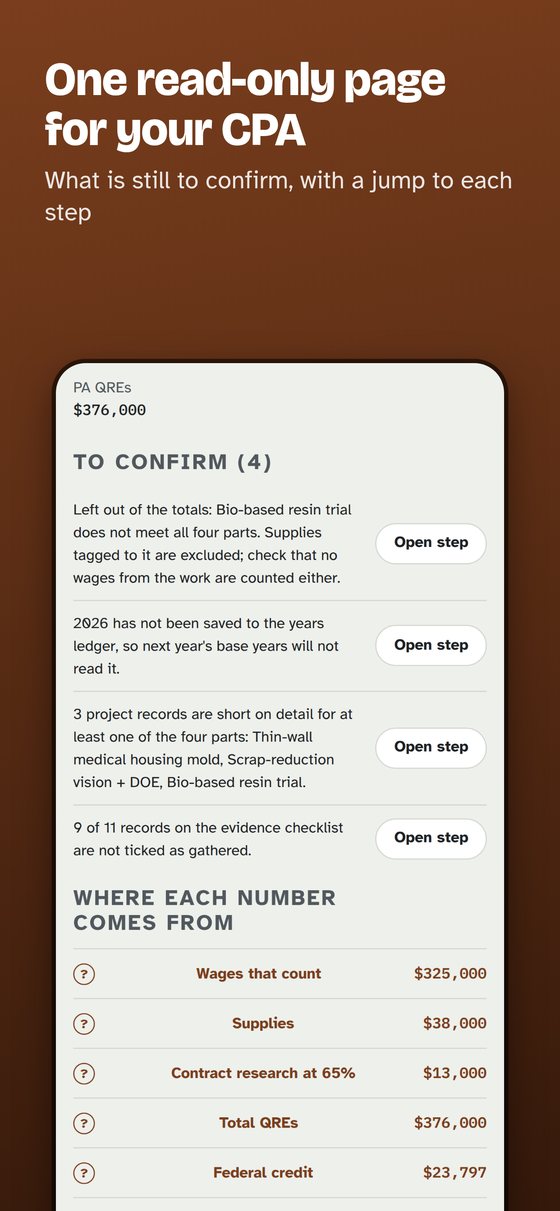
- A CPA review page: what is still to confirm, with a jump to each step
- A workpaper cover with a reviewed-by box
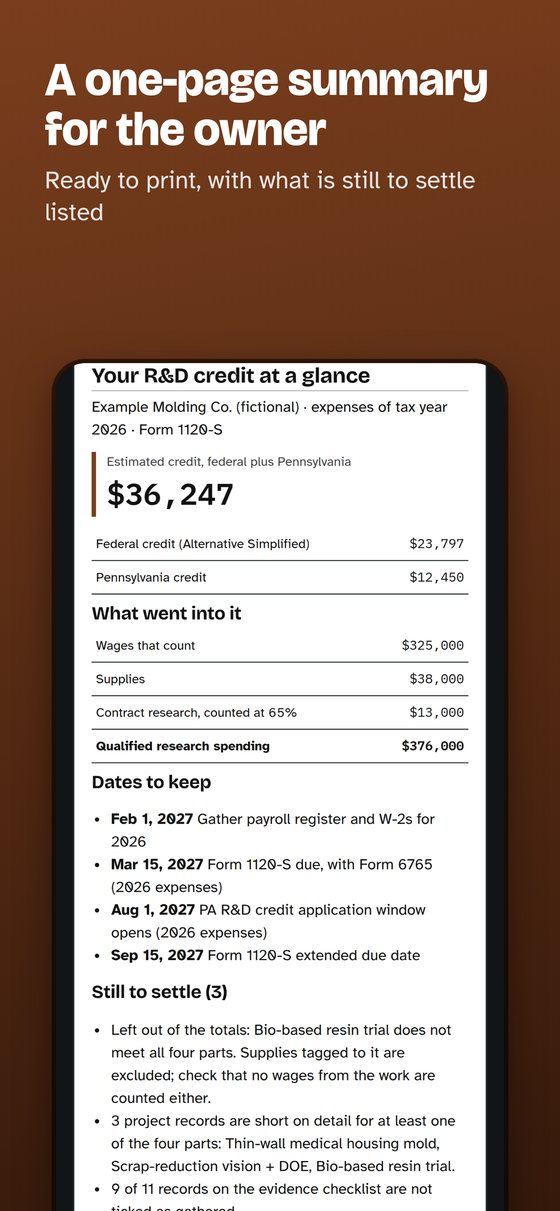
- A one-page owner summary, printed alone or as page one
- Flags where a judgment call is needed
- PDF and a CSV you can save, print or send yourself
- Share with my CPA: one zip with the review summary, a CSV, project records, a blank time log and a request list
- A one-page estimate for partners or a board, labelled an estimate, with the caveats on the page
Pennsylvania R&D credit dates
| Aug 1 to Dec 1, 2026 | Application window for 2025 expenses (myPATH) |
| By May 1, 2027 | Awards for the 2025 expense year |
| Aug 1 to Dec 1, 2027 | Expected window for 2026 expenses, based on the standing law |
From Pennsylvania Department of Revenue's published program page as of November 2026. Confirm on the page before you act.
Price
| Interview, estimates, flags, dates | Free |
| Data sheets and packet, per tax year | $79 |
The interview, estimates, flags and dates are free. The data sheets and workpaper packet are planned at $79 per tax year, through the App Store. Not live yet.
Known limitations
- Credit Desk gives estimates, not tax advice. The owner or their CPA decides what to claim, enters the numbers and files.
- Tax rules change. Each source is the rule as read on the date shown in About; confirm on the source before you act.
- The Pennsylvania 2026 application window (Aug 1 to Dec 1, 2026) is the state's. The 2027 window is shown as expected from the standing law and marked so, until the state announces it.
- A Pennsylvania award is not certain. The state's May 1 notice date is set by law, but a notice can come with a hold, and the larger-company group was prorated to 32.8 percent in the May 2026 round. That is a past figure, not a forecast.
- Federal and Pennsylvania only. No other state, and no state credit other than Pennsylvania's R&D credit.
- The saved PDF packet has not been checked for screen-reader tagging. The CPA zip, the what-if slider and the one-page summary have been tested in browsers, not yet with VoiceOver and the share sheet on an iPhone.
- English only for now.
Private by design
- No account, no ads, no tracking. Your numbers stay on your device.
- Credit Desk never submits anything to the IRS or to Pennsylvania. You or your CPA file.
- Every estimate is labelled an estimate, with its arithmetic.
- Works offline.
Questions
Does it tell me whether my company qualifies?
No. It tests each project against the four-part test using your answers and shows what follows from them. You and your CPA decide what to claim.
Is it a substitute for my CPA?
No. It is a self-help worksheet that gives estimates, not tax advice. Your CPA advises you.
Does it file or apply for me?
No. Credit Desk never submits anything. You, or your own CPA, enter the numbers and file.
Which tax year does it cover?
Expenses for 2026, with the prior years you enter for the base. The Pennsylvania application for 2026 expenses is expected in the Aug 1 to Dec 1, 2027 window.
What does it cost?
The interview and estimates are free. The data sheets and packet are planned at $79 per tax year, in the App Store. Not live yet.
Will my CPA accept the workpapers?
They are organised data sheets with a review box for your CPA. Your CPA decides what to rely on.
Where does my information go?
Nowhere. Everything stays on your device. There is no account.
Do I claim the Pennsylvania credit on my return?
Pennsylvania uses a separate yearly application through myPATH, open August 1 to December 1. Credit Desk organises the numbers and project descriptions; you or your CPA apply.
Is the credit certain to be awarded?
No. It is capped each year. Past results do not predict yours.
Does Pennsylvania check my tax filings?
Revenue checks the tax compliance of the applicant and of owners of 20 percent or more. The worksheet reminds you to look at your own.
Self-help worksheet. Estimates only, not tax advice. The owner or their own CPA decides what to claim and files it.
More to read
Credit Desk is made by Barnyard Greens. Support: [email protected] (not live yet).